1. 开启宝塔伪禁态
登录宝塔面板
切换到网站选项卡
找到你的博客网站,点击右侧设置
在设置弹窗中,左侧找到伪静态选项卡,并切换成它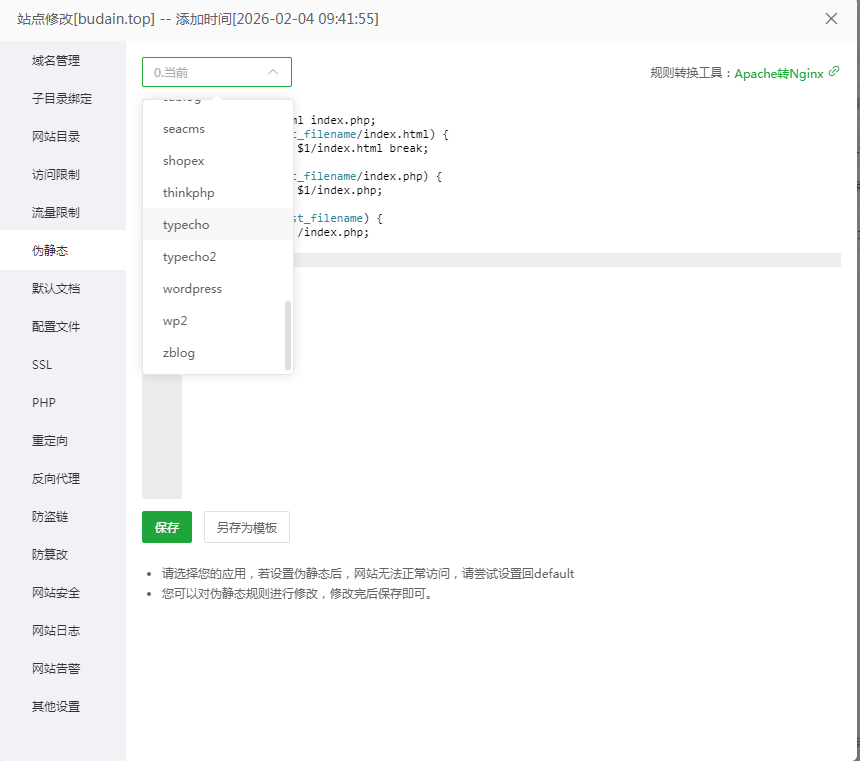
在右侧输入框中填写如下内容
    location / {
  index index.html index.php;
  if (-f $request_filename/index.html) {
    rewrite (.*) $1/index.html break;
  }
  if (-f $request_filename/index.php) {
    rewrite (.*) $1/index.php;
  }
  if (!-f $request_filename) {
    rewrite (.*) /index.php;
  }
}
2. Apache环境开启伪静态
启用mod_rewrite模块:修改httpd.conf,取消LoadModule rewrite_module modules/mod_rewrite.so的注释(去掉前面的#)。
允许.htaccess覆盖:将AllowOverride None改为AllowOverride All(使Apache支持.htaccess文件)。
添加.htaccess规则:在网站根目录创建或编辑.htaccess,添加以下内容:
<IfModule mod_rewrite.c>
    RewriteEngine On
    RewriteBase /
    RewriteCond %{REQUEST_FILENAME} !-f
    RewriteCond %{REQUEST_FILENAME} !-d
    RewriteRule ^(.*)$ index.php [L,E=PATH_INFO:$1]
</IfModule>
虚拟主机用户可直接在面板开启“伪静态支持”,无需修改httpd.conf
本文著作权归作者 [ 布点 ] 享有,未经作者书面授权,禁止转载,封面图片来源于 [ 互联网 ] ,本文仅供个人学习、研究和欣赏使用。如有异议,请联系博主及时处理。